Mybatis结果映射
针对以下业务逻辑, 编码/状态/类型 属性一般通过字典值保存, 业务表中存储code, 字典表中存储对应的名称, 如何在一次查询中直接获取到对应的编码和名称?
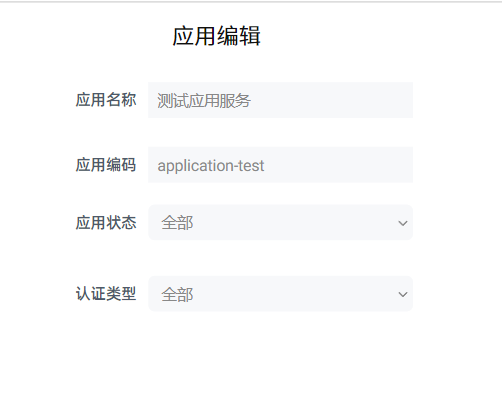
association标签的简单查询
复杂类型映射需要通过 <resultMap ...></resultMap> 标签实现,该标签支持通过数据关系构建复杂对象。
为了方便测试,在数据库中新增字典表
create table dict_test
(
    dict_name varchar(20)   not null comment '名称',
    dict_code char          not null comment '编码',
    dict_type varchar(50)   not null comment '类型',
    dict_sort int default 0 not null comment '排序'
)
    comment '字典表-测试用';
新增对应的实体类
public class DictTest {

    private String dictName;

    private String dictCode;

    private String dictType;

    private Integer dictSort;
    //getter、setter、toString方法省略
}修改AppTestEntity 类,构建为复杂对象
public class AppTestEntity {
    private Long id;
    private String appName;
    private String appCode;
    private String authType;
    private LocalDate createDate;
    private String creator;
    private String appStatus;

    private DictTest authTypeDict;
	//省略getter、setter、toString方法
}
新增mapper接口方法
public interface SimpleQueryMapper {
	AppTestEntity queryAppDetail(@Param("id") Integer id);
}
映射文件
<resultMap id="appDetail" type="appTestEntity" autoMapping="true">
	<!--表示要映射的关系-->
    <association property="authTypeDict" javaType="dictTest">
        <id column="auth_type_dc" property="dictCode"/>
        <id column="auth_type_dt" property="dictType"/>
        <result column="auth_type_dn" property="dictName"/>
        <result column="auth_type_ds" property="dictSort"/>
    </association>
</resultMap>

<select id="queryAppDetail" resultMap="appDetail">
    select t1.*
        ,t2.dict_code as auth_type_dc,t2.dict_name as auth_type_dn,t2.dict_type as auth_type_dt,t2.dict_sort as auth_type_ds
    from (
        select id,app_name,app_code,auth_type,create_date,creator,app_status from app_test where id=#{id}
    ) t1 left join (
        select dict_code,dict_name,dict_type,dict_sort from dict_test where dict_type='app_auth_type'
    ) t2 on t1.auth_type=t2.dict_code
</select>
测试代码
public class SimpleQueryService extends MybatisService<SimpleQueryMapper>{
    @Override
    public void doService() {
        SimpleQueryMapper mapper = super.getMapper(SimpleQueryMapper.class);
        this.testAppAssociation(mapper);
    }

    private void testAppAssociation(SimpleQueryMapper mapper){
        AppTestEntity detail = mapper.queryAppDetail(2);
        System.out.println(detail);
    }
}
打印结果
AppTestEntity{id=2, appName='公共应用', appCode='common', authType='2', createDate=2023-10-31, creator='admin2', authTypeDict=DictTest{dictName='手机号', dictCode='2', dictType='app_auth_type', dictSort=2}}association标签的嵌套查询
以上就是 <resultMap><association>标签的简单用法,该标签还支持在<select>标签中间嵌套 <select> 标签
<resultMap id="appDetail" type="appTestEntity" autoMapping="true">
	<!--这里需要注意,如果app_status作为嵌套select查询的条件时,需要指定app_status和appStatus的映射关系,否则appStatus属性会为空-->
	<result column="app_status" property="appStatus"/>
    <association property="authTypeDict" javaType="dictTest">
        <id column="auth_type_dc" property="dictCode"/>
        <id column="auth_type_dt" property="dictType"/>
        <result column="auth_type_dn" property="dictName"/>
        <result column="auth_type_ds" property="dictSort"/>
    </association>
    <!--
    注意这里的写法
    colomn 属性表示在父sql中的字段名称,也就是上文提到的<select id="queryAppDetail">...</select>查询结果中的app_status,而app_status作为queryAppStatus这个查询sql的入参,也即#{code}
    -->
    <association property="appStatusDict" javaType="dictTest" select="queryAppStatus" column="app_status"></association>
</resultMap>

<select id="queryAppStatus" resultType="dictTest">
    select dict_code,dict_name,dict_type,dict_sort from dict_test
    where dict_type='app_status' and dict_code=#{code}
</select>
打印结果如下:
AppTestEntity{id=2, appName='公共应用', appCode='common', authType='2', createDate=2023-10-31, creator='admin2', appStatus='0', authTypeDict=DictTest{dictName='手机号', dictCode='2', dictType='app_auth_type', dictSort=2}, appStatusDict=DictTest{dictName='临时应用', dictCode='0', dictType='app_status', dictSort=0}}针对以下一对多关系的关联查询如何实现? (应用明细 和 服务列表)
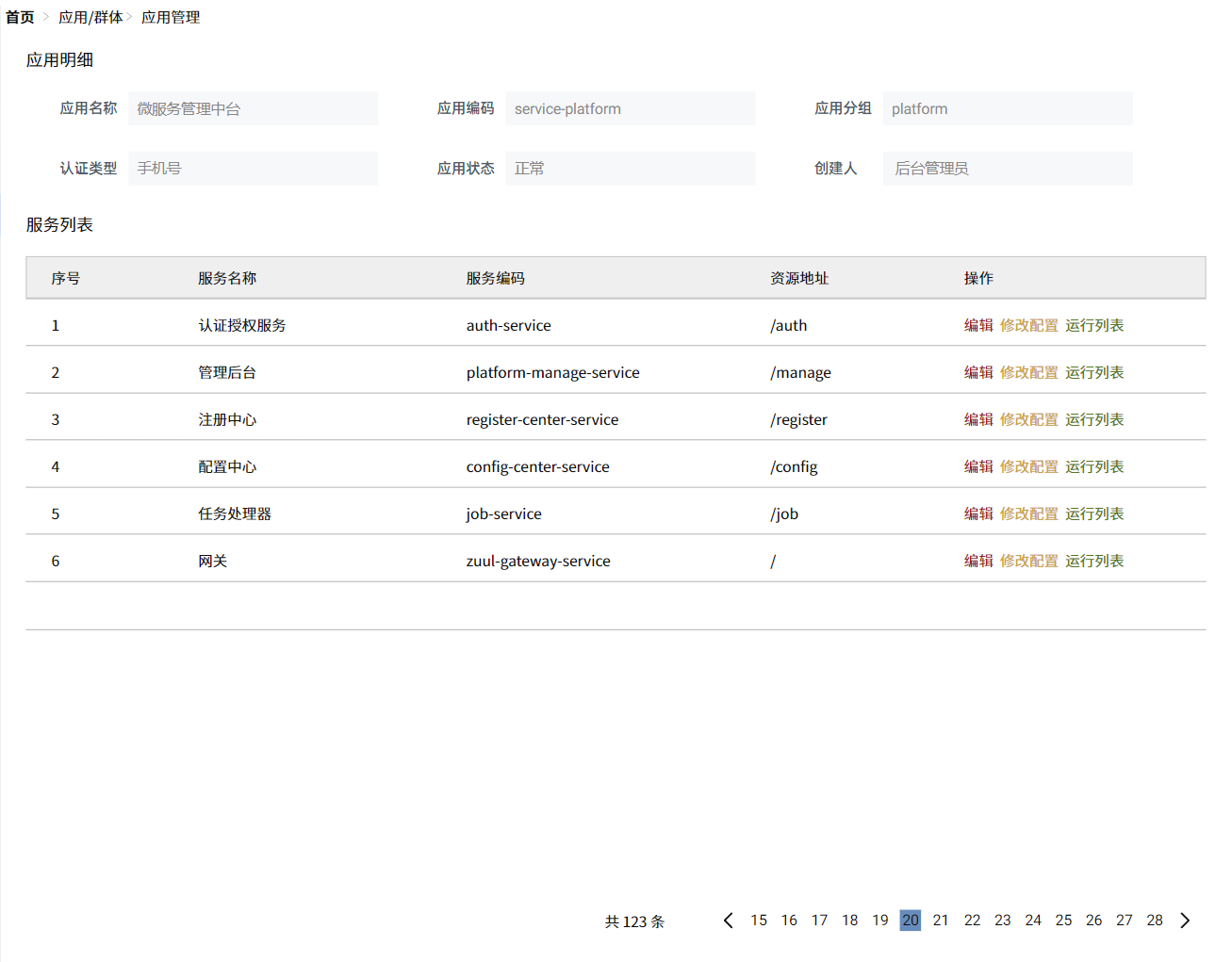
collection集合类型的嵌套查询
以上这个业务是一个典型的详情展示页面,其中的“应用”和“服务”存在一对多关联,需要在AppTestEntity类中添加List<ServiceTestEntity>类型的属性,那么如何通过<resultMap>标签表示这种对应关系呢?
添加数据库表
create table service_test
(
    id           int auto_increment comment '主键ID'
        primary key,
    service_name varchar(50)  not null comment '服务名称',
    service_code varchar(50)  not null comment '服务编码',
    service_path varchar(100) not null comment '资源地址',
    app_id       int          null comment '应用ID'
)
    comment '微服务表';
生成实体类
public class ServiceTestEntity {
    private Long id;
    private String serviceName;
    private String serviceCode;
    private String servicePath;
    private Long appId;
	//getter, setter, toString方法省略
}

public class AppTestEntity {
    private Long id;
    private String appName;
    private String appCode;
    private String authType;
    private LocalDate createDate;
    private String creator;
    private String appStatus;

    private DictTest authTypeDict;
    private DictTest appStatusDict;

    private List<ServiceTestEntity> services;
    //getter, setter, toString
}
映射文件的写法
<resultMap id="appDetail" type="appTestEntity" autoMapping="true">
    <result column="app_status" property="appStatus"/>
    <association property="authTypeDict" javaType="dictTest">
        <id column="auth_type_dc" property="dictCode"/>
        <id column="auth_type_dt" property="dictType"/>
        <result column="auth_type_dn" property="dictName"/>
        <result column="auth_type_ds" property="dictSort"/>
    </association>
    <association property="appStatusDict" javaType="dictTest" select="queryAppStatus" column="app_status"/>
    <collection property="services" column="id" select="queryServices" ofType="serviceTestEntity"/>
</resultMap>

<select id="queryServices" resultType="serviceTestEntity">
    select * from service_test where app_id=#{appId}
</select>
其他内容不变, 打印结果如下:
AppTestEntity{id=null, appName='公共应用', appCode='common', authType='2', createDate=2023-10-31, creator='admin2', appStatus='0', authTypeDict=DictTest{dictName='手机号', dictCode='2', dictType='app_auth_type', dictSort=2}, appStatusDict=null, services=[ServiceTestEntity{id=1, serviceName='配置中心', serviceCode='config-center-service', servicePath='/config', appId=2}, ServiceTestEntity{id=2, serviceName='注册中心', serviceCode='eureka-service', servicePath='/eureka', appId=2}]}collection集合类型的简单查询
和<association>标签一样, <collection>标签也支持嵌套select和单个sql映射, 以上为嵌套select映射, 下面介绍单个sql映射 collections标签的普通查询
- mapper接口添加新方法
- 映射文件添加sql
- 测试类
AppTestEntity queryAppServices(Integer id);<resultMap id="appServices" type="appTestEntity" autoMapping="true">
<!--注意,这里的id一定要配置清楚,会通过这个id来判定app的唯一性(去重)-->
<id column="id" property="id"/>
<collection property="services" ofType="serviceTestEntity" autoMapping="true">
<id column="service_id" property="id"/>
</collection>
</resultMap>
<select id="queryAppServices" resultMap="appServices">
select t1.*,t2.id as service_id,t2.service_name,t2.service_code,t2.service_path,t2.app_id
from app_test t1 left join service_test t2 on t1.id=t2.app_id where t1.id=#{id}
</select>public class SimpleQueryService extends MybatisService<SimpleQueryMapper>{
@Override
public void doService() {
SimpleQueryMapper mapper = super.getMapper(SimpleQueryMapper.class);
this.testAppServices(mapper);
}
private void testAppServices(SimpleQueryMapper mapper){
AppTestEntity detail=mapper.queryAppServices(2);
System.out.println(detail);
}
}打印结果如下:
AppTestEntity{id=2, appName='公共应用', appCode='common', authType='2', createDate=2023-10-31, creator='admin2', appStatus='0', authTypeDict=null, appStatusDict=null, services=[ServiceTestEntity{id=1, serviceName='配置中心', serviceCode='config-center-service', servicePath='/config', appId=2}, ServiceTestEntity{id=2, serviceName='注册中心', serviceCode='eureka-service', servicePath='/eureka', appId=2}]}collection集合类型的多结果集查询
除了以上方式之外, mybatis还提供查询, 即在存储过程中通过执行两个sql获取到对应的查询结果。需要注意,这种将业务逻辑代码存储到数据库中的方式在开发过程中应严格控制使用。
样例代码如下:
数据库新增存储过程
drop procedure if exists queryAppServices;
create procedure queryAppServices(appId int) begin
    select * from app_test where id=appId;
    select id as service_id,service_code,service_name,service_path,app_id from service_test where app_id=appId;
end;
mapper层添加新方法
//注意:只存在一个基本类型包装类的参数时,可以不用@Param注解说明参数名称,可直接使用形参的名称
AppTestEntity queryAppServicesProcedure(Integer id);<resultMap id="appServices" type="appTestEntity" autoMapping="true">
<id column="id" property="id"/>
<!--这里表明resulteSet名称,和select中标注的resultSets内的名称对应-->
<collection property="services" ofType="serviceTestEntity" resultSet="services" autoMapping="true">
<id column="service_id" property="id"/>
</collection>
</resultMap>
<!--重点是标注resultSet名称,和存储过程中的两个查询语句对应-->
<select id="queryAppServicesProcedure" resultSets="app,services" resultMap="appServices" >
{call queryAppServices(#{id, jdbcType=INTEGER, mode=IN})}
</select>测试类代码
private void testAppServicesProcedure(SimpleQueryMapper mapper){
    AppTestEntity detail=mapper.queryAppServicesProcedure(2);
    System.out.println(detail);
}
打印结果
AppTestEntity{id=2, appName='公共应用', appCode='common', authType='2', createDate=2023-10-31, creator='admin2', appStatus='0', authTypeDict=null, appStatusDict=null, services=[ServiceTestEntity{id=1, serviceName='配置中心', serviceCode='config-center-service', servicePath='/config', appId=2}, ServiceTestEntity{id=2, serviceName='注册中心', serviceCode='eureka-service', servicePath='/eureka', appId=2}]}以上的resultMap标签可以等价写成如下两个,效果相同, 注意select标签的resultMap属性需要同步修改
<resultMap id="appServiceCall" type="appTestEntity" autoMapping="true">
    <id column="id" property="id"/>
    <collection property="services" resultSet="services" resultMap="serviceCall"/>
</resultMap>
<resultMap id="serviceCall" type="serviceTestEntity" autoMapping="true">
    <id column="service_id" property="id"/>
</resultMap>
基于注解的结果关系映射
以上的resultMap标签中的元素都有对应等价形式的java注解,这在Mybatis官方文档中有明确的说明
| 注解 | xml等价形式 | 描述 |
|---|---|---|
@Results | <resultMap> | 映射一系列的字段和属性 |
@Result | <result>,<id> | 映射一个字段和属性 |
@ConstructorArgs | <constructor> | 将结果映射到对象的构造方法 |
@Arg | <arg>,<idArg> | 构造方法的一个参数 |
@One | <association> | 一对一关联 |
@Many | <collection> | 一对多关联 |
@Insert | <insert> | 指定新增的sql |
@Delete | <delete> | 指定删除的sql |
@Update | <update> | 指定更新的sql |
@Select | <select> | 指定查询的sql |
@InsertProvider | <insert> | 指定新增的sql provider |
@DeleteProvider | <delete> | 指定删除的sql provider |
@UpdaateProvider | <update> | 指定更新的sql provider |
@SelectProvider | <select> | 指定查询的sql provider |
@ResultMap | 没有 | 指定使用xml文件中的resultMap |
@ResultType | 没有 | 当方法返回值为空时,指定返回值类型 |
@MapKey | 没有 | 将方法的List返回值,转化为一个Map,其中Map的key就是@MapKey(value="")中的内容 |
关于 @Results和 @Result的应用
注册一个新的mapper
<configuration>
	<mappers>
        <mapper resource="mapper/ApplicationMapper.xml"/>
        <mapper resource="mapper/SimpleQueryMapper.xml"/>
        <mapper class="top.sunyog.mybatis.mapper.AppAnnoMapper"/>
    </mappers>
</configuration>
一个简单的查询sql写法是这样的
public interface AppAnnoMapper {
    @Select("select id, app_name, app_code, auth_type, create_date, creator, app_status from app_test where id=#{id}")
    Map<String,Object> selectAppEntityById(Long id);
}
测试类代码:
public class AppAnnoService extends MybatisService<AppAnnoMapper> {
    private AppAnnoMapper mapper;
    @Override
    public void doService() {
        this.mapper = this.getMapper(AppAnnoMapper.class);
        this.testSelectResult();
    }

    private void testSelectResult() {
        Map<String, Object> res = this.mapper.selectAppEntityById(1L);
        res.entrySet().forEach(e-> System.out.println(e.getKey()+":=> "+e.getValue()));
    }
}
打印输出查询结果如下:
app_name:=> 测试应用1
auth_type:=> 1
creator:=> admin
app_status:=> 8
id:=> 1
create_date:=> 2023-10-31
app_code:=> ceshi
可以通过 @Result注解转换查询结果的属性名称,代码如下:
@Result(column = "app_name",property = "APPLICATION_NAME")
@Select("select id, app_name, app_code, auth_type, create_date, creator, app_status from app_test where id=#{id}")
Map<String,Object> selectAppEntityById(Long id);
效果如下,app_name属性的名称已经修改
auth_type:=> 1
creator:=> admin
app_status:=> 8
id:=> 1
create_date:=> 2023-10-31
APPLICATION_NAME:=> 测试应用1
app_code:=> ceshi
如果多个属性的名称都需要重新映射,则使用 @Results
@Results({
        @Result(id = true,column = "id",property = "APP_ID"),
        @Result(column = "app_name",property = "APPLICATION_NAME"),
        @Result(column = "app_code",property = "APPLICATION_CODE"),
        @Result(column = "auth_type",property = "AUTHENTICATION_TYPE"),
        @Result(column = "creator",property = "CREAT_BY"),
        @Result(column = "app_status",property = "STATUS"),
        @Result(column = "create_date",property = "BIRTHDAY")
})
@Select("select id, app_name, app_code, auth_type, create_date, creator, app_status from app_test where id=#{id}")
Map<String,Object> selectAppEntityById(Long id);
效果如下:
APP_ID:=> 1
STATUS:=> 8
AUTHENTICATION_TYPE:=> 1
CREAT_BY:=> admin
APPLICATION_NAME:=> 测试应用1
BIRTHDAY:=> 2023-10-31
APPLICATION_CODE:=> ceshi
和 <resultMap>标签一样,@Result 注解也支持自定义类型转换器,写法如下
//mapper接口代码
@Result(column = "create_date",property = "BIRTHDAY",typeHandler = LocalDateTypeHandler.class)

//测试方法代码
private void testSelectResult() {
    Map<String, Object> res = this.mapper.selectAppEntityById(1L);
    System.out.println(res.get("BIRTHDAY").getClass());
}修改后的打印结果:class java.time.LocalDate 修改前的打印结果:class java.sql.Date
关于 @ConstructorArgs 和 @Arg的应用
这两个注解的作用也是映射结果属性,区别在于 @ConstructorArgs用于通过构造函数映射,而 @Resutls用于setter方法映射。构造函数映射需要注意定义的参数的顺序要和构造函数入参的顺序一致。
- 定义实体类
public class ApplicationEntity implements Serializable {
    private Long id;
    private String name;
    private String code;
    private String auth;
    private LocalDate birthday;
    private String creator;
    private String status;

    public ApplicationEntity( Long id, String name, String code, String auth, LocalDate birthday, String creator
            , String status) {
        this.id = id;
        this.name = name;
        this.code = code;
        this.auth = auth;
        this.birthday = birthday;
        this.creator = creator;
        this.status = status;
    }

    @Override
    public String toString() {
        final StringBuffer sb = new StringBuffer("ApplicationEntity{");
        sb.append("id=").append(id);
        sb.append(", name='").append(name).append('\'');
        sb.append(", code='").append(code).append('\'');
        sb.append(", auth='").append(auth).append('\'');
        sb.append(", birthday=").append(birthday);
        sb.append(", creator='").append(creator).append('\'');
        sb.append(", status='").append(status).append('\'');
        sb.append('}');
        return sb.toString();
    }
}- 定义映射接口方法
@ConstructorArgs({
//这里的顺序需要和实体类的构造函数入参顺序一致
        @Arg(id = true, column = "id", javaType = Long.class),
        @Arg(column = "app_name", javaType = String.class),
        @Arg(column = "app_code", javaType = String.class),
        @Arg(column = "auth_type", javaType = String.class),
        @Arg(column = "create_date", javaType = LocalDate.class),
        @Arg(column = "creator", javaType = String.class),
        @Arg(column = "app_status", javaType = String.class)
})
@Select("select id, app_name, app_code, auth_type, create_date, creator, app_status from app_test where id=#{id}")
ApplicationEntity selectAppArgsById(Long id);- 测试方法
private void testSelectConstructor(){
    ApplicationEntity entity = this.mapper.selectAppArgsById(1L);
    System.out.println(entity);
}
打印结果如下:
ApplicationEntity{id=1, name='测试应用1', code='ceshi', auth='1', birthday=2023-10-31, creator='admin', status='8'}这时,如果调换@Arg注解的先后位置,如下
@ConstructorArgs({
        @Arg(id = true, column = "id", javaType = Long.class),
        @Arg(column = "app_code", javaType = String.class),
        @Arg(column = "app_name", javaType = String.class),
        @Arg(column = "auth_type", javaType = String.class),
        @Arg(column = "create_date", javaType = LocalDate.class),
        @Arg(column = "creator", javaType = String.class),
        @Arg(column = "app_status", javaType = String.class)
})
@Select("select id, app_name, app_code, auth_type, create_date, creator, app_status from app_test where id=#{id}")
ApplicationEntity selectAppArgsById(Long id);
就会产生这样的结果,name和code的映射结果是错误的
ApplicationEntity{id=1, name='ceshi', code='测试应用1', auth='1', birthday=2023-10-31, creator='admin', status='8'}注意:@Arg注解有一个name属性,这个属性在 @ConstructorArgs注解中不能出现,如果出现,构造函数会映射失败导致报错。想要解决这个问题需要在实体类的构造函数中通过 @Param注解指定每个入参的名称和@Arg注解中的name属性一一对应,如下所示:
实体类:
public class ApplicationEntity implements Serializable {
	//省略属性
    public ApplicationEntity(@Param("id") Long id,@Param("name") String name,@Param("code") String code
            ,@Param("auth") String auth,@Param("birthday") LocalDate birthday,@Param("creator") String creator
            ,@Param("status") String status) {
	    ...
    }
    //省略其他方法
}
mapper接口
@ConstructorArgs({
        @Arg(id = true, column = "id", javaType = Long.class, name = "id"),
        @Arg(column = "app_code", javaType = String.class, name = "code"),
        @Arg(column = "app_name", javaType = String.class, name = "name"),
        @Arg(column = "auth_type", javaType = String.class, name = "auth"),
        @Arg(column = "create_date", javaType = LocalDate.class, name = "birthday"),
        @Arg(column = "creator", javaType = String.class, name = "creator"),
        @Arg(column = "app_status", javaType = String.class, name = "status")
})
@Select("select id, app_name, app_code, auth_type, create_date, creator, app_status from app_test where id=#{id}")
ApplicationEntity selectAppArgsById(Long id);
这样就改变了 ResultMap的映射方式(从按顺序改为按名称),即便修改了@Arg的定义顺序,也能正确的映射到对应的属性上
关于@One和@Many的关系映射的应用
改造AppAnnoMapper#selectAppEntityById方法使其能够达成 <association> 标签的效果
public interface AppAnnoMapper {
    @Results(id = "APP_MAP", value = {
            @Result(id = true, column = "id", property = "APP_ID"),
            @Result(column = "app_name", property = "APPLICATION_NAME"),
            @Result(column = "app_code", property = "APPLICATION_CODE"),
            @Result(column = "auth_type", property = "AUTHENTICATION_TYPE"),
            @Result(column = "creator", property = "CREAT_BY"),
            @Result(column = "app_status", property = "STATUS"),
            @Result(column = "create_date", property = "BIRTHDAY", typeHandler = LocalDateTypeHandler.class),
            //添加一个一对一关系,映射到selectAppStatus方法
            @Result(column = "app_status",property = "STATUS_DICT",one = @One(select = "selectAppStatus"))
    })
    @Select("select id, app_name, app_code, auth_type, create_date, creator, app_status from app_test where id=#{id}")
    Map<String, Object> selectAppEntityById(Long id);

	//添加状态字典查询
    @Select("select dict_name, dict_code, dict_type, dict_sort from dict_test where dict_type='app_status' and dict_code=#{code}")
    Map<String,Object> selectAppStatus(@Param("code")String code);
}
原方法的打印结果如下,其中STATUS_DICT属性为 @One关联出的结果
APP_ID:=> 2
STATUS:=> 0
STATUS_DICT:=> [{dict_type=app_status, dict_name=临时应用, dict_sort=0, dict_code=0}]
AUTHENTICATION_TYPE:=> 2
CREAT_BY:=> admin2
APPLICATION_NAME:=> 公共应用1
BIRTHDAY:=> 2023-10-31
APPLICATION_CODE:=> common<collection>的效果改动如下
public interface AppAnnoMapper {
    @Results(id = "APP_MAP", value = {
            @Result(id = true, column = "id", property = "APP_ID"),
            @Result(column = "app_name", property = "APPLICATION_NAME"),
            @Result(column = "app_code", property = "APPLICATION_CODE"),
            @Result(column = "auth_type", property = "AUTHENTICATION_TYPE"),
            @Result(column = "creator", property = "CREAT_BY"),
            @Result(column = "app_status", property = "STATUS"),
            @Result(column = "create_date", property = "BIRTHDAY", typeHandler = LocalDateTypeHandler.class),
            @Result(column = "app_status",property = "STATUS_DICT",one = @One(select = "selectAppStatus")),
            //添加一个一对多关系,映射到selectAppServices方法
            @Result(column = "id",property = "SERVICE_LIST",many = @Many(select = "selectAppServices"))
    })
    @Select("select id, app_name, app_code, auth_type, create_date, creator, app_status from app_test where id=#{id}")
    Map<String, Object> selectAppEntityById(Long id);

    @Select("select id, service_name, service_code, service_path, app_id from service_test where app_id=#{appId}")
    List<ServiceTestEntity> selectAppServices(Long appId);

    @Select("select dict_name, dict_code, dict_type, dict_sort from dict_test where dict_type='app_status' and dict_code=#{code}")
    Map<String,Object> selectAppStatus(@Param("code")String code);
}
关于 @ResultMap 和 @ResultType的应用
可以在映射接口中使用xml文件中定义的resultMap,使用 @ResultMap注解实现
配置文件中新增mapper映射文件配置
<configuration>
...
	<mappers>
        <mapper resource="mapper/ApplicationMapper.xml"/>
        <mapper resource="mapper/SimpleQueryMapper.xml"/>
        <mapper class="top.sunyog.mybatis.mapper.AppAnnoMapper"/>
        <mapper resource="mapper/AppAnnoMapper.xml"/>
    </mappers>
</configuration>
新增xml映射文件
<?xml version="1.0" encoding="UTF-8" ?>
<!DOCTYPE mapper
        PUBLIC "-//mybatis.org//DTD Mapper 3.0//EN"
        "https://mybatis.org/dtd/mybatis-3-mapper.dtd">
<mapper namespace="top.sunyog.mybatis.mapper.AppAnnoMapper">
    <resultMap id="applicationEntityResultMap" type="top.sunyog.common.entity.ApplicationEntity">
        <constructor>            <idArg column="id" javaType="Long"/>
            <arg column="app_name" javaType="String"/>
            <arg column="app_code" javaType="String"/>
            <arg column="auth_type" javaType="String"/>
            <arg column="create_date" javaType="java.time.LocalDate"/>
            <arg column="creator" javaType="String"/>
            <arg column="app_status" javaType="String"/>
        </constructor>    </resultMap>

</mapper>
mapper接口新增测试方法
@ResultMap(value = "applicationEntityResultMap")
@Select("select id, app_name, app_code, auth_type, create_date, creator, app_status from app_test where id=#{id}")
ApplicationEntity selectAppEntityMap(Long id);
测试代码
public class AppAnnoService extends MybatisService<AppAnnoMapper> {
    private AppAnnoMapper mapper;
    ...
	private void testAnnoResultMap(){
	    ApplicationEntity entity = this.mapper.selectAppEntityMap(2L);
	    System.out.println(entity);
	}
}
打印结果如下:
ApplicationEntity{id=2, name='公共应用1', code='common', auth='2', birthday=2023-10-31, creator='admin2', status='0'}@ResultType注解和 xml文件中的<select id="" resultType=""> 属性的作用是完全不同的,@ResultType注解的作用是在mapper类中的方法中传入了 ResultHandler<?> 参数时,说明结果查询结果的类型。 这时,如果不使用@ResultType说明结果类型,ResultHandler也就无法使用了。它的用法如下:
@ResultType(ApplicationEntity.class)
@Select("select id, app_name, app_code, auth_type, create_date, creator, app_status from app_test where id=#{id}")
void selectAppEntityType(Long id, ResultHandler<ApplicationEntity> handler);
测试代码:
private void testAnnoType(){
    this.mapper.selectAppEntityType(2L, new ResultHandler<ApplicationEntity>() {
        @Override
        public void handleResult(ResultContext<? extends ApplicationEntity> resultContext) {
            ApplicationEntity entity = resultContext.getResultObject();
            System.out.println(entity);
        }
    });
}
打印结果如下:
ApplicationEntity{id=2, name='公共应用1', code='common', auth='2', birthday=2023-10-31, creator='admin2', status='0'}关于 @MapKey的应用
基于注解可以实现一个xml映射文件中不支持的功能,即将列表返回值转换成一个Map,其中Map的key可以通过 @MapKey注解控制,实现方法如下:
public interface AppAnnoMapper {
    @MapKey(value = "id")
    @Select("select id, app_name, app_code, auth_type, create_date, creator, app_status from app_test where id >= #{id}")
    Map<Long,ApplicationEntity> selectAppListMap(Long id);
}
测试代码
private void testMapKey(){
    Map<Long, ApplicationEntity> map = this.mapper.selectAppListMap(2L);
    map.entrySet().forEach(o->{
        System.out.println(o.getKey()+":=> "+o.getValue());
    });
}
打印结果如下
2:=> ApplicationEntity{id=2, name='公共应用1', code='common', auth='2', birthday=2023-10-31, creator='admin2', status='0'}
5:=> ApplicationEntity{id=5, name='名称1', code='code-1', auth='2', birthday=2023-11-03, creator='admin3', status='0'}
6:=> ApplicationEntity{id=6, name='name1', code='code-2', auth='2', birthday=2023-11-04, creator='admin3', status='0'}
7:=> ApplicationEntity{id=7, name='jack liu', code='code-3', auth='2', birthday=2023-11-04, creator='admin3', status='0'}